Add tasks
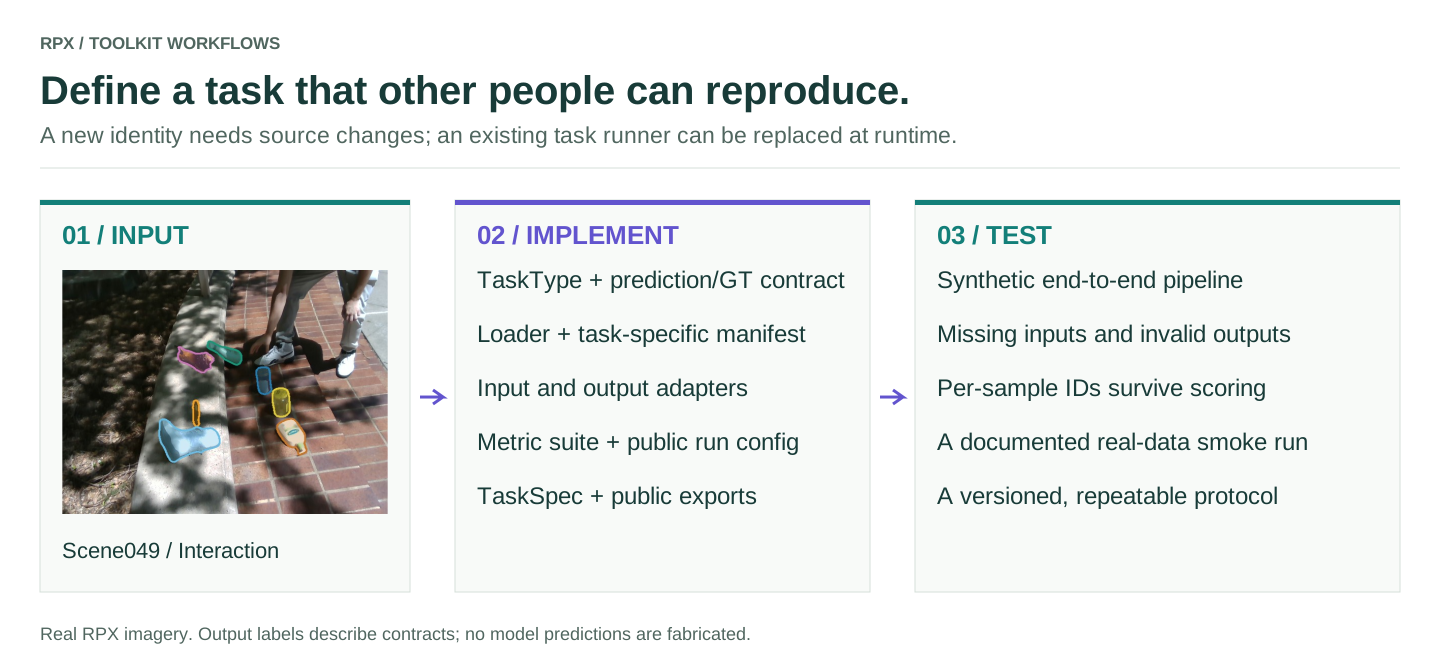
What you can change at runtime
Tasks are members of TaskType, a fixed enum. At runtime you can register a new metric or swap the runner of an existing task. A brand-new task needs a change to the toolkit source; the metric registry won't accept an arbitrary string in place of a TaskType.
Register a runner for an existing task
This example swaps the image-depth runner for a wrapper, keeps the existing metrics, modalities and hooks, and restores the original afterwards.
from dataclasses import replace
from rpx_benchmark.api import TaskType
from rpx_benchmark.tasks.registry import (
    get_task_spec, register_task, unregister_task,
)

task = TaskType.MONOCULAR_DEPTH
original = get_task_spec(task)

def custom_run(cfg):
    # Add your run setup here, then delegate to the existing pipeline.
    return original.run(cfg)

unregister_task(task)
try:
    custom = replace(original, display_name='Custom depth protocol', run=custom_run)
    register_task(custom)
    assert get_task_spec(task).run is custom_run
    # Invoke get_task_spec(task).run(your_config) to use the replacement.
finally:
    unregister_task(task)
    register_task(original)
Registering a task that is already registered raises an error, hence the unregister_task first. get_task_spec(task).run(cfg) goes through the registry; calling a built-in function such as run_monocular_depth directly still runs the built-in.
Add a new task
Work in a source checkout installed with pip install -e './benchmark[dev]'.
- Define the contract in
rpx_benchmark/api.py. Add aTaskTypemember and prediction and ground-truth dataclasses, with units, coordinates, shapes, valid values and sample identity spelled out. - Teach the loader the ground-truth format. Update
loader.py(or the video loader) and the manifest validation, keeping modality names and IDs consistent with the dataset release. An enum member alone doesn't make manifests loadable. - Write the adapter. Add input preparation and prediction conversion under
adapters/, plus amake_numpy_*_modelhelper if a plain function interface makes sense. - Write the scoring. Add a
MetricCalculatorundermetrics/, register it for the new enum member, and import its module inmetrics/__init__.pyso it registers on import. - Write the runner. Add a config and a
run_*function undertasks/. Reuserun_pipelinewhere its input, output and aggregation assumptions fit; sequence- or dataset-level tasks may need their own. - Register and export it. Create a
TaskSpec, import the task module intasks/__init__.py, and export the config and runner fromrpx_benchmark/__init__.py. - Update reports and protocol metadata. Check task names, required modalities, the primary metric's direction, cell records, split handling, and any task-specific branches in Hub downloads or scripts. Register the temporal and geometric hooks only if their assumptions hold.
- Test and document it. Add synthetic tests for the loader, adapter, metric and the whole run, add the task to the parity and workflow tests, then try a small real-data run.
TaskSpec contract
| Field | Requirement |
|---|---|
task |
The new TaskType enum member |
display_name, description |
What users see |
primary_metric |
A scalar key emitted by scoring and used by your runner |
higher_is_better |
Direction of the primary score |
required_modalities |
Dataset modalities the task consumes |
run |
(cfg) → (BenchmarkResult, optional deployment report, paths) |
| Optional hooks | Explicit temporal stability and geometric coherence functions |
tasks/monocular_depth.py is a small example of a pipeline task and tasks/video_depth.py of a sequence task. Both show how registration, scoring and configuration fit together; adapt their assumptions rather than copying them.
When it's done
A new task is ready when the loader and adapter agree, scores match a hand calculation, the registered runner writes per-sample and aggregate results, sample IDs survive the whole pipeline, and the documented example runs from an installed wheel. Test missing modalities and invalid predictions, not only the happy path.